HotPads Rent Apartments
- 4.6
- Rating
- 1.00M
- Installs
- Free
- Price

 Analysis by App-foxy
Looking for a rental can quickly become a full-time chore: opening several sites, comparing map locations, checking whether a listing still fits your budget, and trying to remember which homes were worth a second look. I found HotPads Rent Apartments most useful when I treated it as a map-first starting point rather than a complete replacement for every rental source. It helps turn a broad search area into something I can understand visually, which is especially valuable when commute time, neighborhood feel, or proximity to daily essentials matters as much as the home itself.
This is a free House & Home app from HotPads, designed around finding apartments and homes for rent. Its audience is broad, with an Everyone content rating, and the app has built a substantial user base: more than a million installs and an average rating of 4.6 from roughly forty-four thousand ratings. Those figures do not guarantee that every listing will suit you, but they do suggest that the app is familiar territory for many renters.
What to expect when you open HotPads Rent Apartments
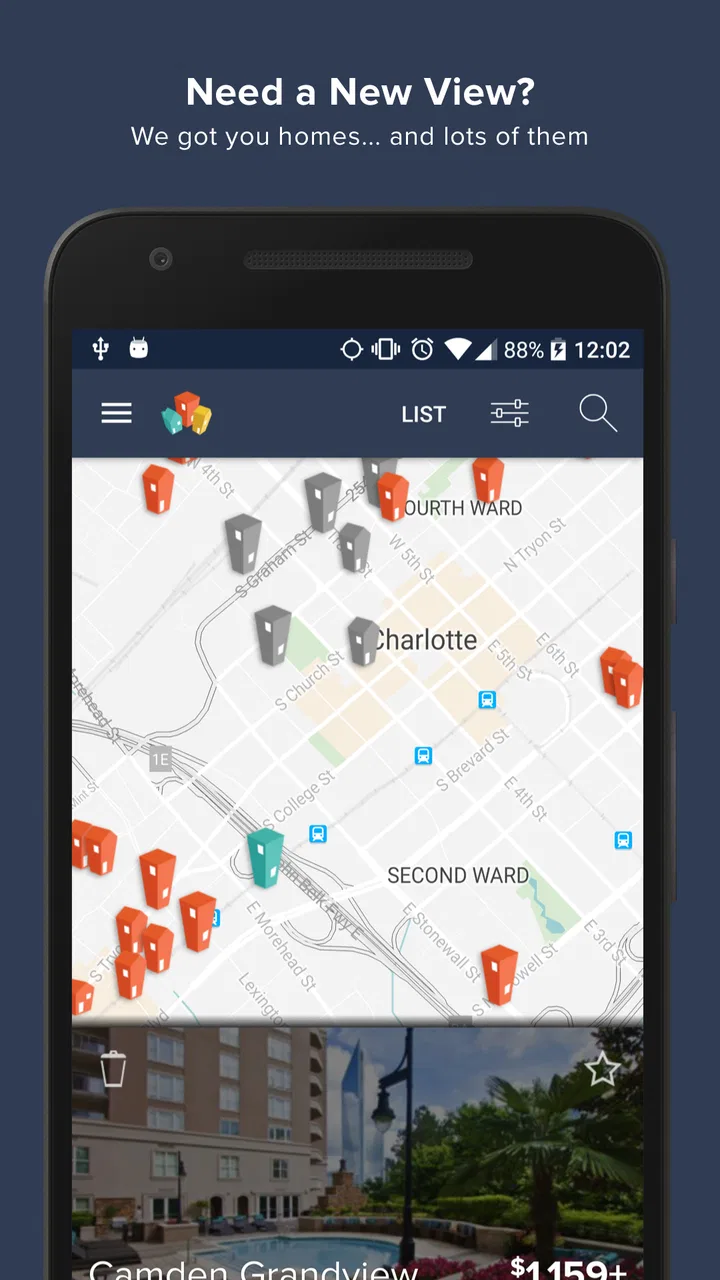
The main idea is straightforward. Instead of starting with a long feed that separates each property from its surroundings, the app puts rental search on a map. I can look at an area, move around it, and see where available homes sit in relation to streets and nearby neighborhoods. That approach changes the way I search: I am not only asking, “Can I afford this apartment?” I am also asking, “Would living here make my everyday routine easier?”
You May Also Like

 Blood Strike: 2.5 Anniversary
Blood Strike’s Loadouts Turn Every Drop Into a Tactical Gamble
A close look at Blood Strike’s custom loadouts: how fast access to signature weapons reshapes its battle royale rhythm, rewards preparation, and narrows the gap between fights.

 Pandora - Music & Podcasts
Pandora’s Music Is Easy to Start, but Harder to Recover
Pandora’s strength is its low-effort path from a seed to a station. Its weak spot is how much confidence it asks you to place in connection, setup, and quiet recovery.

 8 Ball Pool
 Is Built on Rivalries, Rematches, and Routine
A close look at the rivalries, rematches, shared routines, and unanswered safety questions that turn a quick pool match into a persistent mobile community.

 Samsung Music
’s Quiet Strength Is Playing What You Already Own
Its reach comes less from spectacle than from dependable access to a personal library. That simplicity is both the app’s strongest retention engine and its ceiling.

 AccuWeather: Weather Radar
AccuWeather Review: A Quick, Clear Forecast for Everyday Decisions
For everyday plans, the best forecast is the one you can understand quickly. AccuWeather makes rain timing, radar, and local conditions easy to act on, with a few trade-offs.

 Hill Climb Racing
Why Hill Climb Racing Still Turns Crashes Into One More Run
A tiny car, a bumpy hill and one more upgrade: Hill Climb Racing keeps resurfacing because its simple chaos makes every near-miss feel personal.
More From Our News Desk



That distinction matters for first-time renters. A property can look attractive in isolation but become inconvenient once I consider the route to work, school, public transport, grocery shopping, or family. A map gives those decisions a visible shape. I can begin with a general area and gradually narrow my attention instead of guessing neighborhood names and hoping the results match the location I actually want.
The app is also useful when I am flexible about the exact property but not flexible about the area. For example, if I need to stay close to a particular part of town, I can scan the surrounding rental market and compare clusters of homes. On the other hand, if I already know the exact building or street I want, a traditional property page or direct contact with a landlord may get me to a decision faster.
My first recommendation is to decide what kind of search you are doing before you begin. If location is the priority, start with the map. If the home itself is the priority, use the available property details to compare candidates. Mixing both approaches is often best, but knowing your priority prevents endless scrolling.
Why the map changes the search
A list tends to encourage quick comparisons based on visible details. A map encourages geographic thinking. I can notice whether available homes are concentrated in one part of an area, whether my preferred zone has fewer choices, or whether moving a little farther out might create more possibilities. This is one of the app’s most practical strengths because it helps expose trade-offs that a list can hide.
There is a useful habit here: I do not immediately open every marker. I first look for the shape of the market around my target area. If the map is crowded with options, I can be more selective. If it is sparse, I know early that I may need to widen the search or reconsider one of my requirements. That saves time and makes the process feel less random.
The map should not be treated as proof that a home is suitable. It shows where a listing is positioned, but it cannot replace reading the property information, checking the practical fit, and confirming the details with the relevant contact. I see it as a decision tool, not a guarantee.
Setting up a useful first search
Getting started is less about creating a perfect search and more about giving yourself a clear first target. I would begin with the neighborhood, city area, or general location where I genuinely expect to live. A vague search across an entire region can produce too much noise, while an overly narrow search can make the market look empty before I have understood it.
Before browsing deeply, I make a short private list of priorities. Mine would include the maximum rent I can realistically handle, the area I need, the type of home I am willing to consider, and the features that are truly non-negotiable. This matters because rental apps can make attractive listings feel equally important. Having the list ready helps me judge what I see instead of reacting to every appealing photo or convenient location.
I also separate “must have” from “nice to have.” A certain location or number of bedrooms may be essential, while a balcony, updated kitchen, or extra space may simply be desirable. That distinction is especially helpful when the map reveals that the ideal combination is uncommon. I can then decide whether to adjust the home, the area, or the timing of my search.
The Android version is currently listed as version 6.21.0 and requires Android 10 or later. That makes checking the operating system worthwhile before installing, particularly if you are using an older phone. The app is free, so the main commitment is the time spent reviewing properties rather than paying to access the search itself.
A first-search routine that avoids wasted time
My preferred routine is simple. I choose one realistic area, inspect the map before opening individual listings, and then review only a small group of homes that appear to match my priorities. I note why each one remains interesting: location, home type, apparent value, or a particular feature. Without that reason, it is easy to collect listings without learning anything from them.
When I return to the search, I compare candidates by the same criteria. One home may be cheaper but farther from the places I use every day. Another may sit in a better location but offer less space. Looking at those differences side by side is more useful than deciding based on whichever listing happens to look best in the moment.
A less obvious benefit of this method is that it reveals which requirement is causing the most difficulty. If nearly every suitable location has homes outside my budget, then the problem is probably financial rather than a lack of searching. If the price works but the home type does not, I may need to change the property preference. The app cannot make that decision for me, but its map-based layout helps expose the pattern.
Reaching the first meaningful result
For a first-time user, success should not mean finding the perfect home immediately. A better first milestone is identifying a few realistic possibilities and understanding why they deserve further attention. HotPads Rent Apartments is well suited to that early stage because it lets me move from a broad location to specific properties without losing sight of the surrounding area.
Here is the workflow I would suggest. Start by locating the part of town that fits your routine. Scan the available homes around it. Open the listings that appear to meet your main requirements, and read them carefully rather than relying on the first visible impression. Then reduce the group to the candidates you would genuinely contact or investigate further.
That last step is important. A saved or interesting listing is not automatically a viable one. I ask myself whether the location works, whether the home matches my basic needs, and whether I would still consider it after checking the details more closely. If the answer is no, I remove it from my mental shortlist. This keeps the search focused.
A realistic everyday example would be someone moving for a new job. They may know the office area but not the surrounding neighborhoods. With the app, they can inspect rental options near the workplace, then look outward to see whether a slightly different area offers more choices. The map makes the commute question part of the first search instead of an afterthought.
Another useful scenario is a renter whose current lease is ending soon. Rather than browsing randomly, they can use the app to identify several areas that might work, compare the density of available homes, and build a short list for follow-up. The value is not only in discovering a property; it is in organizing the search before time pressure takes over.
How to judge a listing without getting carried away
I try to read each listing in layers. First, I check whether the location is acceptable. Second, I look at the home itself and compare it with my must-have list. Third, I consider what needs confirmation before I invest more time. That order prevents attractive presentation from distracting me from the basic question of whether the property fits my life.
I also avoid assuming that a map position answers every location question. A nearby marker does not tell me how long a journey will feel at the time I travel, whether the route is convenient, or whether the surrounding area suits my routine. The map is excellent for orientation, but I still need to think like a resident rather than a browser.
Most importantly, I would never treat an app listing as the final stage of a rental decision. A serious candidate deserves careful verification through the available property information and direct communication with the appropriate contact. The app helps me find and compare possibilities; it does not remove the responsibility to check them.
Where first-time users may become confused
The biggest possible confusion is expecting the map to behave like a complete live inventory of every rental opportunity. A map-based search is powerful, but the usefulness of any search depends on what appears in the app and how closely those listings match your needs. I would keep other legitimate rental sources in mind, especially if I am searching in a small market or under strict requirements.
Another point of friction is the temptation to zoom in too quickly. When I focus on a tiny area from the beginning, I may miss nearby neighborhoods that offer a better balance between price, space, and convenience. I prefer to begin with a wider view, understand where the options are concentrated, and then narrow the map once I know what the area offers.
It is also easy to confuse a promising location with a promising home. A marker in the right neighborhood may still lead to a property that fails on size, layout, or another personal requirement. I keep a simple rule: the map earns a listing a closer look, but the property details earn it a place on my shortlist.
Users may also wonder whether the app is suitable for every kind of housing search. In my view, it is strongest for people who want to explore apartments and homes for rent by area. It is less compelling for someone who already has a specific rental contact, is dealing directly with one building, or needs a highly specialized search that depends on information the map cannot communicate well.
How it compares with familiar alternatives
Compared with walking through neighborhood listings on a general property website, HotPads Rent Apartments feels more geographically focused. Its advantage is that I can understand the relationship between homes and the surrounding area quickly. A conventional list may be better when I want to sort through many property details in a strict order, while this app is better when location is central to the decision.
Compared with searching through classified advertisements, the app offers a more structured way to move around a market. Classified browsing can sometimes surface unusual opportunities, but it can also require more manual organization. HotPads gives me a clearer visual starting point, although I would still use other sources when I want to broaden coverage or cross-check a difficult search.
Compared with contacting property managers directly, the app is earlier in the process. Direct contact can answer questions about a particular home, but it is not as efficient for discovering the wider set of possibilities around a neighborhood. I see the two methods as complementary: use the map to decide where to look, then use direct communication to determine whether a specific home is truly suitable.
This comparison also explains who should skip the app. If you already know the exact property you want, the map may add little. If your search depends on highly detailed building information or a very narrow set of conditions, you may need a source that presents those details more prominently. But if you are still learning the rental landscape, the geographic view is a meaningful advantage.
Practical habits that make the app more useful
One of my strongest tips is to search in rounds rather than trying to finish everything in one session. In the first round, learn the shape of the area. In the second, compare the most promising homes. In the third, decide which properties deserve direct follow-up. This reduces decision fatigue and keeps a large map from becoming an overwhelming wall of choices.
A second tip is to record the reason for keeping each candidate. “Good location” is too vague, so I would write something more useful for myself, such as “closer to work,” “more options nearby,” or “fits the preferred home type.” When I revisit the search, those reasons help me remember what made a listing relevant and make it easier to compare candidates fairly.
A third insight is to use the map to test compromises deliberately. Move outward from your ideal area and observe whether the search improves enough to justify the extra distance. Then move back toward the center and see what you would have to give up. This turns a vague feeling of “maybe farther away” into a clearer trade-off between location and available homes.
I would also avoid letting a visually appealing listing set the entire direction of the search. First establish the area and the practical requirements; only then let individual homes compete for attention. That order helps prevent one attractive option from making an inconvenient neighborhood seem acceptable.
Finally, treat the first shortlist as a working document, not a commitment. Rental searches change as I learn more about what is available and what I can realistically accept. Removing a property is progress if it clarifies the search. The app is most helpful when I use it to make better decisions, not when I measure success by the number of listings I collect.
Who will get the most from HotPads Rent Apartments?
I would recommend it to first-time renters who feel unsure about where to begin, people relocating to an unfamiliar area, and anyone whose decision depends heavily on neighborhood geography. It is also useful for renters who want to compare several nearby areas before contacting anyone. The free price makes it easy to use as an exploratory tool while I build a realistic picture of the market.
The app is less likely to satisfy someone who wants a single definitive source, a direct path to one known property, or a search based on details that are difficult to judge from a map. It should also not replace careful verification and direct questions before making a rental commitment. That is not a flaw unique to this app; it is simply the boundary between discovering a listing and evaluating it responsibly.
HotPads is developed by HotPads, and its current version is 6.21.0. With around thirteen thousand written reviews alongside its broader rating base, it has enough user feedback to show that it is an established rental-search option rather than an obscure experiment. I still judge it by how well it fits my search style: the map is the reason to try it, while the quality of my own follow-up determines how useful the search becomes.
My recommendation after using the full search path
I see HotPads Rent Apartments as a practical first step for finding rentals, especially when I care about the relationship between a home and the neighborhood around it. The app does not make the rental process effortless, and it should not be mistaken for a substitute for reading details or asking important questions. What it does well is give the search a clear geographic structure.
If I were helping a friend use it for the first time, I would tell them to begin with one realistic area, scan the map before opening too many listings, and define a small set of non-negotiable requirements. I would then ask them to keep only the homes they would genuinely investigate and to use the map to test whether a nearby area offers a better compromise.
My final view is that HotPads is best when you use it to understand your options, not merely to collect them. For a renter who needs help turning an unfamiliar market into a manageable search, that is a worthwhile strength. For someone with a highly specific or already-established rental path, another source may be faster. For everyone in between, this free app is a sensible place to begin, provided the final decision is based on careful checking rather than a map pin alone.
FAQs for HotPads Rent Apartments
01What features does HotPads offer for apartment searches?
HotPads provides a comprehensive set of features for apartment searches, including a user-friendly map-based search interface, filters for price range, pet policies, and more. Users can also check real-time availability, save favorite listings, and receive notifications for new matches. The app also includes neighborhood insights to help you make informed decisions.
02Is HotPads available for both Android and iOS devices?
Yes, HotPads is available for both Android and iOS devices. You can download it from the Google Play Store for Android or the Apple App Store for iOS. The app is optimized for both platforms, ensuring a seamless experience whether you're using a smartphone or a tablet.
03Does HotPads charge any fees for using its services?
HotPads is free to download and use for searching rental properties. However, some landlords or property managers might charge fees for applications or background checks, which are independent of the app. Always check with the property listing for any additional costs before proceeding with an application.
04How accurate is the listing information on HotPads?
HotPads works to provide accurate and up-to-date listings by partnering with property managers and landlords. While they strive for accuracy, discrepancies can occur. It’s advisable to contact the listing agent directly through the app to confirm details before making any rental decisions.
05Can I contact landlords or property managers directly through HotPads?
Yes, HotPads allows you to contact landlords or property managers directly through the app. Each listing features a contact option, enabling you to send messages or inquiries. This direct communication helps you gather more information and arrange viewings efficiently.
Pros
- Intuitive interface for easy navigation.
- Comprehensive search filters available.
- Real-time notifications for new listings.
- Detailed neighborhood insights provided.
- User reviews for property credibility.
Cons
- Occasional app crashes reported.
- Limited offline functionality.
- Ads can be intrusive at times.
- Some listings lack complete details.
- Inconsistencies in rental prices.

HotPads Rent Apartments
Gallery